Genjutsu AI: What Higgsfield's Tool Does and How to Use It
Genjutsu AI is Higgsfield's video-to-video tool: what Motion Transfer and Object Swap do, limits, steps, credit costs, and an option with no source clip.
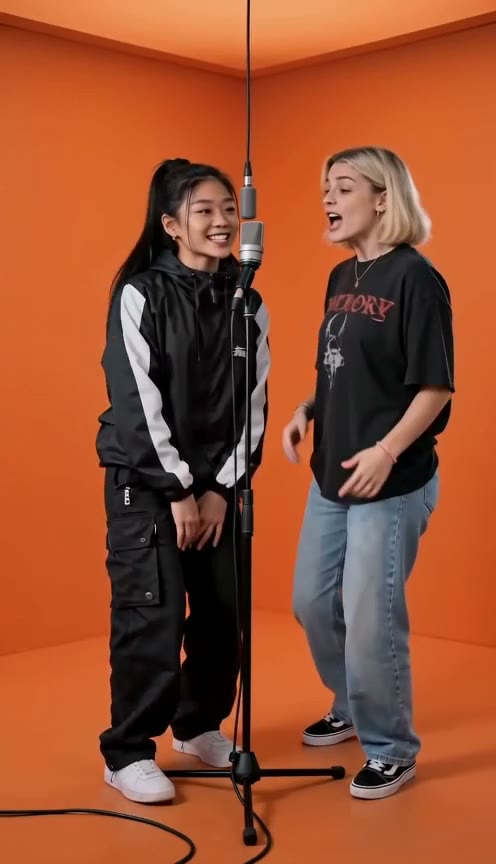
Genjutsu AI is Higgsfield's video-to-video tool. You upload a clip, and it either keeps the motion and rebuilds everything else from your references (Motion Transfer) or changes one thing you select and leaves the rest of the shot as filmed (Object Swap). It is the tool behind many "swap yourself into the viral clip" videos, and it has nothing to do with the illusion techniques of the same name in Naruto, although search results for the term mix the two.
Last checked: October 4, 2026. We read Higgsfield's own pages and several third-party guides. We did not run Genjutsu ourselves, and every claim below is labeled as coming from Higgsfield or from someone else.
What Genjutsu does
Higgsfield's Genjutsu page describes it as "reality manipulation for video" and explains the two modes in its own words:
- Motion Transfer "keeps the motion, camera and timing while rebuilding the scene from your references."
- Object Swap "changes a selected character, outfit, product, location or object while preserving the rest of the original shot."
Higgsfield says you can recast characters, change locations, introduce products or wardrobe, and run many versions from one setup. Its launch guide says it works on real footage or generated video, and that a text prompt is optional because presets (it lists 30+) can drive the whole change.
Limits Higgsfield lists
| Item | What Higgsfield says | Where |
|---|---|---|
| Source video | 4 to 30 seconds | Genjutsu page FAQ, launch guide |
| Longer video | Trimmed to 30 seconds | API reference |
| Reference images | Up to 30 per generation in the app; 1 to 8 in the API | Genjutsu page FAQ; API reference |
| Output resolution | Up to 1080p (480p, 720p, 1080p; API default 720p) | Launch guide; API reference |
| Prompt | Optional | Launch guide, API reference |
Third-party guides do not always match. One guide says 3 to 30 seconds and up to 40 reference images, another says 4 to 30 seconds and 1 to 30 images. Higgsfield itself says the limits are "as shown in the generator", so treat the numbers in the app as the final word.
How to use Genjutsu, step by step
This follows Higgsfield's five-step workflow, with tips from third-party guides marked as such.
- Open Genjutsu and pick a mode. Choose Motion Transfer to reuse the movement with a new cast or world, or Object Swap to change one element.
- Upload one source video. It must be 4 to 30 seconds long. A guide on Axiabits suggests a clear clip with one visible subject, readable body motion and no heavy blur, because blur and obstruction make the rebuild harder.
- Add reference images. These define the character, outfit, product or location. A third-party tool page, Max H3, says the tray order becomes Image 1, Image 2 and so on, and that you should refer to those names in the prompt when it matters who goes where.
- Choose a preset or write a short description. Higgsfield says a full prompt is not needed.
- Check the credit cost, generate, and review. Compare the result with the source for faces, hands and timing, then export the version you like.
What it costs
From Higgsfield: each run uses its standard credit system and shows the cost before you generate. The launch guide gives these examples for a 15-second clip, "verified September 2026", and says credit costs may vary with settings:
| Length and resolution | Credits | Approx. price |
|---|---|---|
| 15 sec, 480p | 40 | $2.00 |
| 15 sec, 720p | 104 | $5.20 |
| 15 sec, 1080p | 144 | $7.20 |
A free tier, a free first run, plan prices and the queue time are not stated on the Genjutsu pages we read, and Higgsfield's pricing page returned no readable content. Third-party reports about free use disagree, which we cover in our Hotel Lobby on Higgsfield guide. For anything beyond the examples above, we say "not stated".
What people use it for
Higgsfield's own examples include music videos, wardrobe changes, one ad adapted for many markets, and keeping the same character across several videos shot on a phone. The launch guide adds style swaps and AI-influencer content.
The use that drives the search term right now is the Hotel Lobby meme: point Motion Transfer at a clip of the original performance and put new people in. We keep that walkthrough in one place, so see Making Hotel Lobby on Higgsfield for the steps, the reported problems and the free-use disagreement.
Things to watch before you post
- You need a clip you may use. Higgsfield says what you generate is yours to publish across organic and paid channels, subject to its Terms of Use. That covers the output, not the rights in someone else's footage.
- The audio may be someone else's recording. Third-party guides say swap workflows keep the original audio and call that a copyright gray area on social platforms, which may mute or remove videos. Higgsfield's pages do not address audio.
- Get consent. Only use photos of people who agreed to appear. A child needs a parent or guardian's permission, and songs with kids are family-friendly only.
- Label it as AI and do not present a generated video as real footage of anyone.
- Test small. Every run costs credits, and 1080p costs more than three times a 480p draft in Higgsfield's example, so check the idea at a lower resolution first if the app offers it.
No source clip, or you want your own song
A swap tool needs a clip to start from. If you only have two photos, or you would rather not reuse someone else's recording, Rap Duet makes a new performance instead. You upload two photos (or one photo of both people), pick the orange Hotel Lobby stage, optionally add a topic, and get a vertical rap duet over an original AI song with new lyrics, usually in a few minutes.
The honest limits:
- It is not a face swap. The result is a new performance, so it will not look identical to a viral clip, and the original song and lyrics are not used.
- The song is original AI music. You cannot upload your own recording or use your own voice.
- Videos are short: the default is 12 seconds, and subscribers can go up to 15.
- New accounts get free credits for one short 5-second Mini song, with a limited number of free spots each day. Everything else uses credits: packs start at $9.90 for 120 credits (new customers only), and plans start at $19.90 a month. Failed renders are refunded.
For a side-by-side of the options, see Hotel Lobby AI apps compared, or how to do the Hotel Lobby trend for the CapCut and duet routes. If you like the idea of a trend video with an original song, the Raindance AI trend page does the same on a golden-hour pier.
Quick decision guide
- You have a clip you may use and want the exact motion: use Genjutsu, check the credit cost first, and start at a low resolution.
- You want to change one object or outfit in a shot: Object Swap is built for that.
- You only have photos and want a finished video with its own song: use a tool built for that, such as Rap Duet.
- You plan to post on TikTok or Reels: check the platform's music rules and label the video as AI-generated.
Last checked: October 4, 2026. If a limit or price here is out of date, tell us and we will update the page.
FAQ
What is Genjutsu AI?
Genjutsu is Higgsfield's video-to-video tool. You upload an existing clip, and it either keeps the motion and rebuilds the scene from your references (Motion Transfer) or changes one selected element and leaves the rest of the shot alone (Object Swap). It is unrelated to the genjutsu illusions in the anime Naruto.
How long can the video be, and how many images can I add?
Higgsfield's Genjutsu page says reference videos of 4 to 30 seconds and up to 30 reference images, with output up to 1080p. Its API reference says 1 to 8 image references, and that videos over 30 seconds are trimmed to 30. Third-party guides quote other numbers, so trust the limits shown in the generator.
How much does Genjutsu cost?
Higgsfield says each run shows its credit cost before you generate. Its Genjutsu blog post lists a 15-second example at 40 credits (about $2.00) for 480p, 104 credits (about $5.20) for 720p and 144 credits (about $7.20) for 1080p, and notes that costs may vary with settings. Free allowances are not stated on the Genjutsu pages we read.
Is it safe to use someone else's video or song?
Higgsfield says what you generate is yours to publish, subject to its Terms of Use. That does not settle the rights to the source clip. Third-party guides say swap workflows keep the original audio and call that a copyright gray area, so only use footage you may use and check the rules of where you post.
Can I get a similar video without a source clip?
Rap Duet needs only two photos, or one photo of both people, and makes a new vertical performance over an original AI song in a few minutes. It is not a swap into an existing clip, so it will not look identical to a viral video. New accounts get free credits for one short 5-second Mini song, with a limited number of free spots each day.
No source clip? Start from two photos.
Upload two photos, pick the orange Hotel Lobby stage and get a 12-second duet over an original AI song.
Try the Hotel Lobby AI makerMaking Hotel Lobby on HiggsfieldHotel Lobby AI video makerHotel Lobby AI apps comparedHow to do the Hotel Lobby trendRaindance AI trend