How to Do the Hotel Lobby Trend (CapCut or AI)
Two ways to make a Hotel Lobby video: a CapCut template or an original AI duet from two photos. Steps, photo tips, fixes and posting advice.
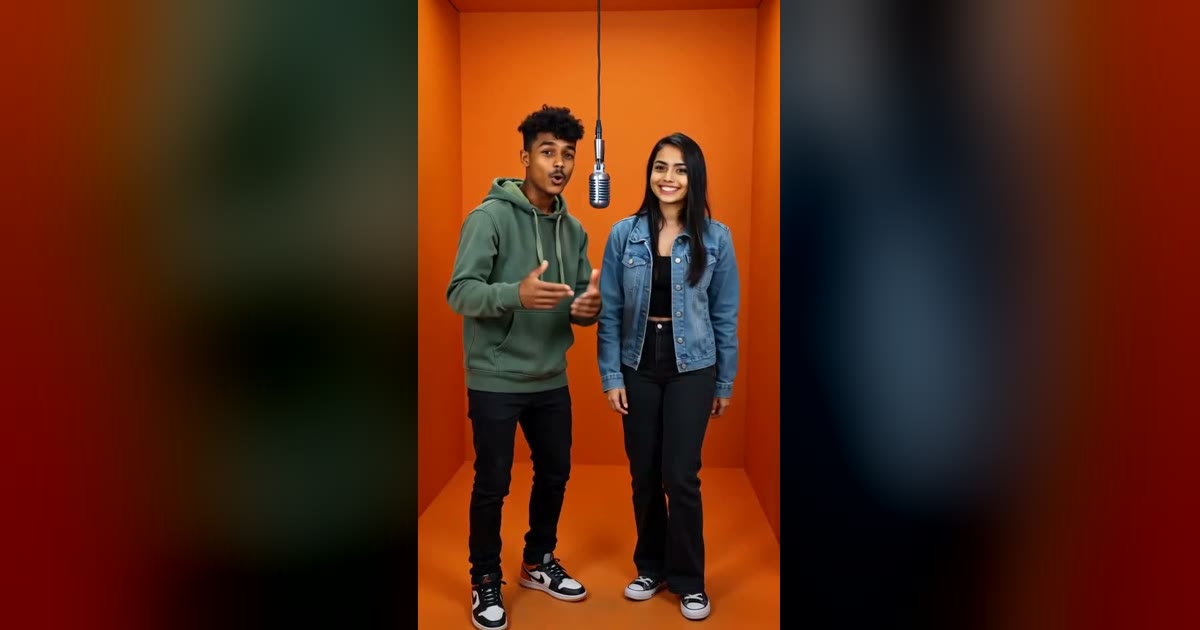
You have seen the clip: two people trading verses at one microphone in front of a glowing orange wall, except the two people are a cat and a dog, your coworkers or somebody's grandfather. This guide shows two ways to make your own version, explains what each one can and cannot do, and covers the details that decide whether the result looks good: photos, wording, fixes, and how to post it.
Short version: a CapCut template is the fastest way to put your face into a video that already exists. An AI duet is the way to get a video that is actually about you and your friend, with a song nobody else has. Pick based on what you want to post.
What the Hotel Lobby trend is
The format starts with a song. "Hotel Lobby (Unc & Phew)" is by Quavo and Takeoff, who recorded as Unc & Phew. It was released on May 20, 2022, as the first single from their album Only Built for Infinity Links, according to Wikipedia.
The clip behind the meme is a different thing: their performance of the song on A COLORS SHOW, released in June 2022. The two stand against the show's bright orange backdrop and trade verses into a shared microphone, as XXL and Complex describe it.
The meme took off on TikTok in early September 2026. People used AI tools to swap other faces into that performance, keeping the movement, lip-sync and audio of the original. Both outlets list celebrities, fictional characters and animals among the swaps. Quavo reposted the original performance on September 23, 2026.
Three details explain why it spread. The orange box is instantly recognizable even at thumbnail size. Two performers means two characters to cast, so every friend group, couple and pet owner has a version. And a few seconds of fast, rhythmic rap is easy to rewatch and share.
Complex also reports that some fans pushed back, arguing the performance should be treated as a memory of Takeoff, who died in November 2022, rather than raw material for endless AI remakes, and pointing to the use of people's faces, voices and copyrighted work without permission. That is worth keeping in mind for the rest of this guide: use your own face and the faces of people who have said yes.
Two ways to make one
| CapCut template | Original AI duet | |
|---|---|---|
| What you get | The original performance with your photos in it | A new video of your two people rapping a new song |
| Song | The original recording | An original AI song and lyrics |
| Movement | Whoever made the template | Generated for your photos |
| Custom topic | No | Yes |
| Cost | Usually free to try | Credits per video |
| Best for | A quick joke that follows the trend exactly | A video that is specifically about you and your friend |
Neither is better in general. If your goal is to join the exact meme everyone recognizes, use a template. If you want something that is yours, or you do not want to depend on a copyrighted recording, generate an original.
Method 1: use a CapCut template
CapCut templates are community-made video edits with placeholders for your own photos or clips. The Complex report mentions that CapCut templates have helped the Hotel Lobby format spread, and CapCut also publishes its own pages about the trend, so there are plenty of options.
The general flow looks like this:
- Find a Hotel Lobby template. Search for “Hotel Lobby” in CapCut's templates, or open the template link that some TikTok posts show.
- Preview a few. Check whether it asks for one photo or two before you pick, and whether the example looks right.
- Add your photos when the template asks for them.
- Preview the result, then export.
The buttons and labels change as the app updates and each template is different, so follow the prompts on your screen rather than a fixed list of taps.
What a template can and cannot do
A template is a finished edit with your picture dropped in. That sets some limits you should know about before you spend an evening on it:
- Movement and timing belong to the template. You are borrowing someone else's choreography. Your two subjects will move the way the template moves.
- No custom words. The audio is whatever the template uses. You cannot make the video rap about your friend's habit of arriving forty minutes late.
- Quality varies. Photos with strong side lighting, hands covering the face or heavy filters tend to look worse in any face-replacement effect. A clear, front-facing photo helps.
- Templates can disappear. They are created by individual users, so one that worked last week may not be available today.
- Audio can be flagged. The template uses a commercial recording. Platforms may mute, limit or remove videos that use music without permission, depending on where and how you post.
If those limits are fine for what you are making, a template is a perfectly good tool. Many people only want a 10-second joke for the group chat.
Method 2: make an original duet from two photos
This is the route Rap Duet is built for. You give it two photos and it generates a vertical video of those two people trading verses over an original song, in a stage you pick. The orange Hotel Lobby stage is the look of the trend. Nothing from the real recording is used.
The steps below follow the generator on the Rap Duet home page.
Step 1: add your photos
You can choose Two photos (one clear face per person) or One photo of both (a single picture where both faces are visible). Upload JPG, PNG or WebP files up to 12 MB. A photo must be at least 300 pixels on its short side, and the app will tell you if one is too small.
Only use photos of adults who have agreed to appear.
Step 2: pick a stage
Select Hotel Lobby (orange) for the trend look. The other presets are Luxury Lobby, Studio Booth and Street Cypher. If you subscribe to a plan, there is also a Custom option where you describe your own stage.
Step 3: choose quality and an optional style
The default is Standard quality: 480p, 12 seconds, vertical 9:16. You can open the quality settings to change tier or format. Mini, Fast and Standard are available to everyone, while Ultra and 1080p come with a plan. Current costs are on the pricing page.
You can also choose a song style (Hype, Funny, Sweet, Diss, Birthday or Chill) and type a topic. The topic matters more than people expect, and it gets its own section below.
Step 4: make the video
Press Make our rap video. Most videos finish in about three minutes. You can leave the page while it renders and open the finished song from My songs later. When it is ready you can play it, download it or share it.
Rap Duet charges credits for each video and has no free trial. If a render fails, you are not charged, and a request that gets blocked for safety never uses credits. If you only want the words first, the rap lyrics generator is free.
How to take photos that work
Most disappointing results come from the input photo, not the setting. Photos that work well:
- Face forward, eyes visible. A slight turn is fine. Profiles, sunglasses and hands in front of the mouth are not.
- Even light. Daylight from a window beats a flash or a dim restaurant. Strong shadows across half a face are hard to reproduce.
- One person per photo in two-photo mode. If the photo is a crop from a group picture, crop tightly so the right person is obviously the subject.
- Head and shoulders, or waist up. You want the face large enough to see detail, but you also want to show the outfit you want in the video.
- Different backgrounds are fine. Two photos taken in different rooms is normal and works.
- Skip heavy filters. Beauty filters and stylized effects change faces in ways that make results less consistent.
If both people are in one picture, make sure both faces are large and clear. A far-away group shot with small faces is the usual reason one-photo mode disappoints. When in doubt, take two separate selfies.
Give the video something to rap about
If you leave the topic blank you will get a generic hype track. A specific topic gives you lines that feel personal. Compare:
- Weak: “Two friends rapping.”
- Better: “Two roommates arguing over whose turn it is to do the dishes, ending in a truce.”
Include one real detail, such as a shared nickname, a running joke or an event. Keep it kind. The song is meant to be funny and shareable, not hurtful to someone watching it.
Writing exact lines word for word is part of the monthly and yearly plans. With credits, the video uses your topic and style and writes fresh bars for the pair. If you want to draft your own lines, use the 1: and 2: prefixes to say who raps each line. Our trend ideas guide has ten ready-made examples.
Troubleshooting
“That photo is over 12 MB.” Export a smaller version or take a screenshot of the photo. Resizing to a width of about 1500 pixels is plenty.
“One of the photos is too small.” The short side needs to be at least 300 pixels. Use the original image rather than a thumbnail forwarded through a chat app.
The two faces look too similar or get mixed up. Use two photos rather than one, and choose photos where the two people look clearly different in clothing, hair and framing.
The result does not look quite like the person. Try again with a front-facing, evenly lit photo and fewer accessories. Different photos can give noticeably different results.
My request was blocked. Rap Duet checks photos, lyrics and finished videos automatically and blocks anything sexual, hateful, violent or unsafe. A blocked request does not use credits. Check that the photo shows an adult and that your topic is not insulting or explicit, then try again.
It is taking a long time. Busy periods and higher quality tiers can take longer than three minutes. You do not need to keep the page open.
Posting to TikTok and Instagram Reels
The video is vertical by default, which is what both platforms expect, so there is nothing to crop.
- Length. The default is 12 seconds, which suits short-form feeds. Do not pad it.
- First second. Both people are on screen from the start, so you do not need an intro.
- Caption. A line that names the relationship works better than a generic hashtag list. “My grandpa and me, in the lobby” invites replies. Tag the other person if they agreed to appear.
- Label it. Say it is AI-generated. TikTok and Instagram both have their own tools for marking AI-made content, so use them, and do not pretend it is real footage of anyone.
- Post natively. Upload the file to each app instead of sharing a link, so it plays inline.
Copyright and consent
Two separate questions come up, and they have different answers.
The song is the copyright question. The 2022 recording belongs to its owners, and the AI trend reuses it. In Rap Duet, the song and lyrics are generated new for every video, so you are not posting a copyrighted recording. The video is not affiliated with Quavo, Takeoff or COLORS, and it does not reuse the performance or the artists' likeness.
The photos are the consent question. Use photos of yourself and of adults who have said they are happy to appear, and tell them what the video is for. Do not use photos of someone who has not agreed, do not use celebrity photos, and do not present an AI video as something a real person actually did.
That is the whole process: choose a method, use good photos, give it one specific detail to rap about, and label it as AI when you post. When you are ready to start, open the generator.
FAQ
Is there a free way to make a Hotel Lobby video?
Community templates in video editors such as CapCut are the usual free route, and they are quick. They reuse someone else’s fixed edit. Rap Duet has no free trial because video generation costs credits, but its rap lyrics generator is free and failed renders are never charged.
Can I make a Hotel Lobby video with one photo of two people?
Yes. In Rap Duet, switch the toggle to “One photo of both” and upload a clear photo where both faces are visible. Two separate photos usually give each person a cleaner face, so use them when you can.
Does Rap Duet use the original Hotel Lobby song?
No. Every video gets an original AI-generated song and lyrics. Nothing from the Quavo and Takeoff recording or the COLORS performance is used, and Rap Duet is not affiliated with them.
How long does it take to make the video?
Most Rap Duet videos are ready in about three minutes. You can leave the page while it renders and find the song in My songs later.
Can I use a photo of a celebrity or a friend who has not agreed?
No. Only use photos of adults who have agreed to appear. Rap Duet blocks unsafe requests, and a blocked request never uses credits.
Make your own Hotel Lobby video
Upload two photos, keep the orange Hotel Lobby stage selected and get a 12-second duet over an original AI song.
Open the generatorHotel Lobby AI video makerFree rap lyrics generatorHotel Lobby trend ideas