Making Hotel Lobby on Higgsfield: Steps, Costs, Free Limits and Fixes
How people make the Hotel Lobby video with Higgsfield Genjutsu, what Higgsfield says about limits and credits, what is reported about free use, and alternatives.
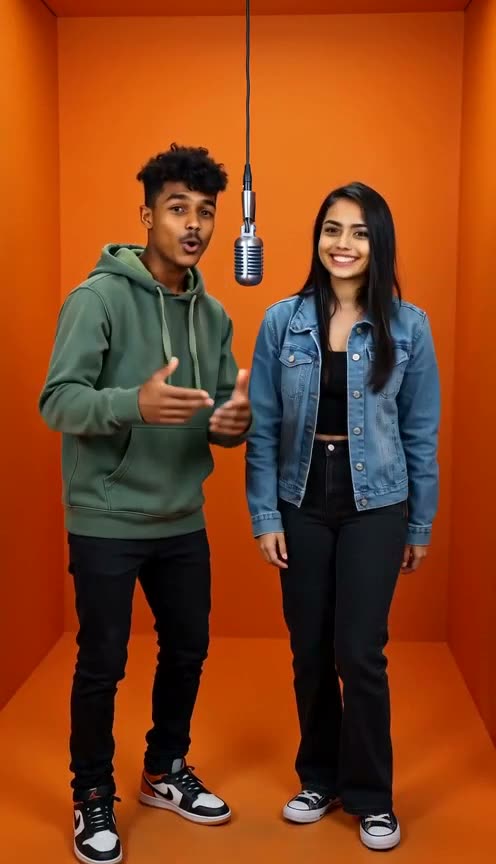
If you have seen the Hotel Lobby video and wondered how people made it on Higgsfield, the short answer is that there is no Hotel Lobby button. The version people share is built with Higgsfield's general video-to-video tool, Genjutsu, pointed at a clip of the original performance. This guide explains what Higgsfield says its tool does, how third-party guides use it for this trend, what is said about cost and free use, which problems come up, and when a simpler route fits better.
Last checked: October 3, 2026. We read Higgsfield's pages and several third-party guides. We did not run the Higgsfield workflow ourselves, and we label every claim below as coming from Higgsfield or from someone else.
What Higgsfield is
Higgsfield describes itself as an "AI-native creative suite" for making images, video and voice from text prompts or references. Its home page lists video models, a restyle tool and a studio for AI influencers, among other products. It is a broad toolbox rather than a one-purpose meme app.
The part that matters here is Genjutsu. According to Higgsfield's Genjutsu page, it takes an existing video and rebuilds part of it, in two ways:
- Motion Transfer "keeps the motion, camera and timing while rebuilding the scene from your references."
- Object Swap "changes a selected character, outfit, product, location or object while preserving the rest of the original shot."
The Genjutsu blog post lists these limits: a source video of 4 to 30 seconds, up to 30 reference images per generation, results up to 1080p, and no full text prompt required because presets work on their own. Higgsfield's pages do not mention Hotel Lobby.
How people make the Hotel Lobby video on Higgsfield
Everything in this section is described by third-party guides, not by Higgsfield. They mostly agree on the same shape of workflow:
- Get the source clip. Guides tell you to use a short section of the original COLORS performance, about 19 to 29 seconds depending on the guide, which keeps within Genjutsu's stated 4 to 30 second range. Check that you are allowed to use the clip where you plan to post.
- Prepare one reference image per person. One guide recommends front-facing, well-lit photos, full-body if possible. A Substack walkthrough goes further and uses four reference images in a set order: a character sheet, a close-up face, a full-body shot and a styling reference.
- Open Genjutsu and choose Motion Transfer. Upload the source video first, then the reference images.
- Write a prompt that assigns people to positions. The common pattern is a short instruction such as "replace the man on the left with Image 1 and the man on the right with Image 2." A Media.io guide suggests naming left and right distinctly and describing a different outfit for each person.
- Check the credit cost, then generate. The guides say to review faces, hands, timing and placement before you download.
- Change one thing at a time. The Substack author reports that a second attempt with different styling was not better than the first and advises saving the version you like before experimenting.
The guides also say the motion, camera work, orange set and original audio stay, and only the people change. That is the appeal: the result looks like the meme. It is also the catch we cover below.
Cost and free use: what is stated and what is reported
From Higgsfield. The Genjutsu page says each run shows its credit cost before you generate. The Genjutsu blog post gives example prices for a 15-second clip: 40 credits (about $2.00) at 480p, 104 credits (about $5.20) at 720p and 144 credits (about $7.20) at 1080p. Higgsfield's blog on affordable video generators cites a Starter plan at $15 a month with 200 credits. The Genjutsu pages we read do not mention a free tier, a free trial or a watermark policy, and we could not read a usable pricing page.
From third parties, and they disagree.
- One guide says the first generation is free for new accounts, with no card needed, through a free-generations toggle in the app. The same guide says the allowance varies by account and does not refill, and that a 24-second 720p test used roughly 330 credits during a promotion (about 480 at the standard rate).
- Other pricing reviews describe a free plan with zero monthly credits. One says the free plan has no video generation at all; another says free output carries a Higgsfield watermark, while a third says it does not. Their paid-plan figures also differ from Higgsfield's own blog, for example Starter at $19 a month with 270 credits.
- In the Reddit thread "Create the Hotel Lobby video meme for free?" on r/ArtificialInteligence, several users say the first Higgsfield video is free but slow: one wrote that it "takes forever to load", another that they had waited for hours without it finishing, and one said a run had been processing for two days. These are individual reports from late September 2026, not something we measured.
Plans, promotions and free allowances change often. The safe reading is: expect the Genjutsu run to use credits, treat a free first run as possible but unconfirmed by Higgsfield's pages, and read the cost shown on the screen before you press generate.
Common problems people report
- Waits on free runs. See the Reddit reports above. Free allowances usually come with lower priority or limits, but Higgsfield's pages we read do not say so, so we cannot confirm the cause.
- Faces or positions swap or blend. Media.io's guide says this happens when faces in the input are small, blocked or blended. Its fixes: clearer reference photos, an explicit left and right assignment, space between the two subjects and a distinct outfit for each person.
- Iteration costs credits. Because every run is billed, trying many variations adds up quickly. Higgsfield's example pricing shows 1080p costing more than three times a 480p draft, so test at a lower resolution first if the app offers it.
- The audio is the original recording. A third-party guide says the workflow preserves the original song and calls that a copyright gray area on Instagram, TikTok and YouTube. Platforms may mute or remove videos that reuse a recording. Check the rules of where you post.
- You need to find and cut the source clip yourself. There is no template: the video, the references and the prompt are all yours to supply.
When a two-photo, original-song tool fits better
The Higgsfield route makes sense if you want the closest possible match to the viral clip and you are comfortable preparing a source video, reference images and a prompt, and paying credits for each attempt.
It is the wrong route if you want something quicker, you only have two ordinary photos, or you do not want to post someone else's recording. That is where Rap Duet fits. You upload two photos (or one photo with both people in it), keep the orange Hotel Lobby stage selected, optionally add a topic, and get a vertical rap duet video with an original AI song and lyrics.
The honest limits:
- It is a new performance, not a face swap into the original clip, so it will not look identical to the meme. Rap Duet is not affiliated with Quavo, Takeoff or COLORS.
- The song is an original AI song. You cannot use the original track, your own voice or an uploaded recording.
- A render takes a few minutes. Videos are short: the default is 12 seconds, and subscribers can go up to 15 seconds.
- New accounts get free credits for one short 5-second Mini song, with a limited number of free spots each day. Everything else uses credits: packs start at $4.99 for 70 credits, and plans start at $19.90 a month. Failed renders are refunded.
For a side-by-side of other options, see our Hotel Lobby AI apps compared. If you like the idea but want the Migos-style look as a more general stage, the Migos AI page covers it. Our how-to guide walks through the CapCut and AI-duet routes.
Quick decision guide
- You want it to look exactly like the viral clip: use a swap workflow such as Higgsfield Genjutsu, accept the original audio, and budget credits for retries.
- You want to spend as little as possible: check what the app currently shows as free before you plan around it. Reports about Higgsfield's free allowance conflict.
- You have two photos and want a finished video with its own song: use a tool built for that, such as Rap Duet.
- You plan to post on TikTok or Reels: prefer an original song, or check the platform's music rules first, and label the video as AI-generated.
- You are unsure: try one cheap, low-resolution test run before committing credits to the best version.
Consent and copyright
Whichever tool you use, only use photos of adults who agreed to appear, skip celebrity photos and do not present an AI video as real footage of anyone. Swap workflows reuse someone else's performance and recording, so think about where you post it.
Last checked: October 3, 2026. If something here is out of date, tell us and we will update the page.
FAQ
Does Higgsfield have an official Hotel Lobby feature?
We could not find one. Higgsfield documents Genjutsu, with Motion Transfer and Object Swap, as a general video-to-video tool, and none of the Higgsfield pages we read mention Hotel Lobby. The Hotel Lobby recipe comes from third-party guides that point Motion Transfer at the original performance clip.
Is the Higgsfield Hotel Lobby video free?
Higgsfield says each run shows its credit cost before you generate, and the Genjutsu pages we read mention no free tier. Some third-party guides claim a first generation can be free for new accounts, and other pricing reviews describe the free plan as having no video credits. Those accounts disagree, so check the credit cost shown in the app before you start.
What is Higgsfield Genjutsu?
Per Higgsfield, Genjutsu takes an existing video and rebuilds part of it. Motion Transfer keeps the motion, camera and timing and rebuilds the scene from your references. Object Swap changes a selected character, outfit, product, location or object and keeps the rest of the shot. Higgsfield lists source videos of 4 to 30 seconds and up to 30 reference images.
Does the Higgsfield version keep the original song?
Third-party guides say yes, the workflow keeps the original audio, and one of them calls that a copyright gray area when you post. Higgsfield’s own Genjutsu pages do not address audio. Rap Duet is different: every video gets an original AI song and lyrics.
What can I use instead if I only have two photos?
Rap Duet needs only two photos, or one photo of both people, and generates a new vertical duet over an original song in a few minutes. It is not a face swap into the original clip, so it will not look identical to the meme. New accounts get free credits for one short 5-second Mini song, with a limited number of free spots each day.
Want an original Hotel Lobby-style duet?
Upload two photos, keep the orange Hotel Lobby stage selected and get a 12-second duet over an original AI song.
Try the Hotel Lobby AI makerHotel Lobby AI video makerHotel Lobby AI apps comparedHow to do the Hotel Lobby trendMigos-style AI video maker